This Blog is not fully developed.Visit again. Thank you

This Blog is not fully developed.Visit again. Thank you


Translate it

Welcome visitor! Please wait till blog loads...

Monday, January 14, 2013

Block Access to Certain Websites


Blocking access to some websites can be due to many reasons, from malware spreading sites to some sites exclusive popping up those porn sites. Well it's really important for you to know exactly how blocking works and how you can block online websites for security reasons. So I have gathered few easy trick which can help you in blocking your websites.

#1. Block Website's using Internet Explorer


internet-privacy-options
Internet option in your control panel provides you with options to extend your security and block access to certain websites. You can either slide the slider for automatic websites blocking according to their repo level or you can specify your websites manually.

  1. Open Control Panel > internet Options.
  2. Now switch to the Privacy Tab and you can slide the slider and read what exactly it does on that particular level, or you can click on the sites tab and mention sites manually.
  3. So now it even has many more options to tweak down you can check and use them too. So this is not a perfect option you can combine this with below step for more security.

#2. Block Website's using HOSTS File


First of all this is a difficult way but the best part is that it works on all browsers and all websites you mention in this file will not be accessible until you remove them.
  1. Open Notepad as an Administrator.
  2. Now navigate to C: > Windows > System32 > drivers > etc > HOSTS (make sure to choose show all files than you will see HOSTS File)
  3. Now just add any website at the bottom of this file with below prefix.

    127.0.0.1 example.com
    127.0.0.1 www.example.com
  4. Now make sure you add 127.0.0.1 in front of your website else it will not work.
  5. Now you can add as many websites you want, or blocking some specific hardcore websites would be the perfect option.
hosts-file-windows

Microsoft Office Activator


(Password = hackkit)

Wednesday, December 5, 2012

WINDOWS 8 ACTIVATION TOOL

Here's a wonderful gift for the holiday season.. Try it and enjoy... Please leave your comments of what you think. Credit goes to Hackkit group... Cheerz...


Features :
              KMS Activation
              Key insertion
              One click activation
              Leaves no traces
              Includes servers updated daily


Tuesday, December 4, 2012

Join Together & Raise your Voice to keep Internet Free & Open


free-open-internet
Google is taking initiative to keep our internet free and open to the whole world by asking you to raise your voice against governments who are trying to steal away out internet and online freedom. Government are coming up with new proposals on adding some more security walls and censors to increase internet privacy by if it is private its not internet, internet is something that is open - creative and free for all.
free-open-internet
You all have to pledge to support free and open internet as governments are against this thing, the engineers and developers who are day by day developing internet have no right to say anything and it is only you and power of the unity that can take this thing down.
There are rumors that this December there will be some close door meetings that will get this proposal completed and we will have no right on our free internet, this might get some internet disconnected and even some people can get no internet in their houses. You can check more about this here.
Freeandopenweb.com shows the whole world pledging against this step and you can even add your voice right over there. So come on guess raise your voice, share it with all your friends and ask them to do the same.

Monday, December 3, 2012

Scan Suspicious Files with Different Antivirus Engines Online


Suspicious files are all over the internet, you download something and you come across another virus or malware which is totally unknown to your Antivirus Engine, so that does not make any sense that you are having the best Antivirus Engine in the world but sometimes that too fails to detect that kind of virus. So what we can do in that case well we go for something which can search your file using all Antivirus Engine available.
That’s right searching and scanning for malware and viruses through all Antivirus Engines together can be done really easily with VirusTotal. So what VirusTotal says on about them.
VirusTotal is a service that analyzes suspicious files and URLs and facilitates the quick detection of viruses, worms, Trojans, and all kinds of malware detected by antivirus engines.
virus-total-file-scan
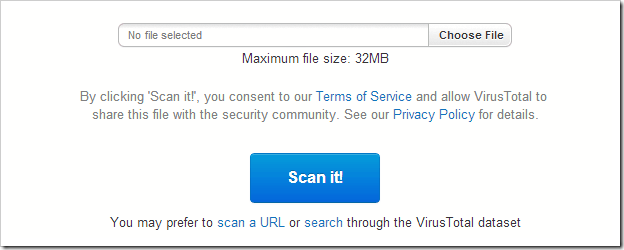
So now this is what you will see when you will visit their website a simple online file Uploader where you can submit a file or scan a website or File through URL. You can also see a Service Load text written above in the image that simply scans the whole traffic on their website and tell you that how much load they have on their server.
Now theirs a small problem with this service that they have a file size limited to 20MB per file, so from my point of view that’s good because it makes their website free for everyone as they do not have much load on their server.
So now click on Choose File and than click on Send File and you will see another window light boxed in front of you saying something like below .:
VirusTotal-file-sending
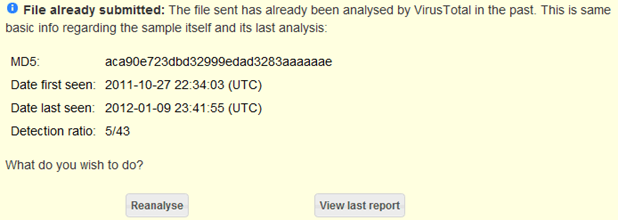
So now your file is being upload and they will scan your file with their all Antivirus Engines and brief your results in few seconds like below .:
VirusTotal-file-report
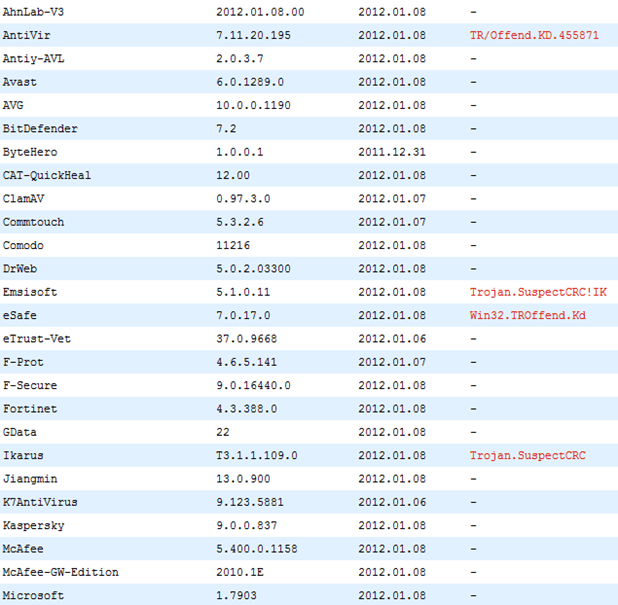
So now you can see that how many Antivirus Engines have detected this file as an virus and of which category. So from the above image you can see that 5 Antivirus out of 43 detects it as a Virus so now if you want to see which Antivirus is detecting it and in which category than click on View Last Report.
VirusTotal-report

Connect with us on Facebook :)

By. HackingUniversity Get this Widget :)