This Blog is not fully developed.Visit again. Thank you

This Blog is not fully developed.Visit again. Thank you


Translate it

Welcome visitor! Please wait till blog loads...

Sunday, February 12, 2012

Charge mobile with Peepal leaves

Its very Strange But True Very True.Now, you do not require any mobile charger to charge your mobiles. Only there is need to use green leaf of peepal tree and after some time your mobile will get charged.

No soon the people came to learn this development, they tested it and found encouraging results. If your mobile has been discharged and you are inside a jungle then you need not to use any charger. You Should pluck two peepal leaves and your workwould be done.

It is very good idea and easy to charge your mobile. You would have to open your mobile battery and connect it with peepal leaf. After that without shaking mobile set you should set the battery in your mobile set. After some time your mobile would be charged.

Though it is unbelievable but as soon as the residents of Chitrakoot came to know about the discovery they could not believe the news. But when they saw it practically then the incident proved true.
Now hundreds of mobile holders are using this technique and charging their mobiles. 

Step by Step guide to charge your mobile battery using Peepal leaf:

1- Open your mobile cover
2- Take out your battery
3- Take two to three fresh leaves of Peepal/Pipal/Ashwattha tree
4- Touch the stub of these leaves on your mobile battery terminal for a minute
5- Clean the mobile battery terminal with the soft cloth
6- Put your battery again in your mobile and switch it on
7- Now you can see the result
8- If required repeat the process with fresh leaves

Windows 8 Developer Preview ISO Image Download

Windows 8 as you all know is yet to be released in the public but its developer preview version is released and being downloaded by many geeks around the world to test the new ultimate windows. 
Windows 8 Developer Preview ISO Image DownloadWindows 8 Developer Preview ISO Image Download
So you can download the official developer preview versions for Windows 8 from Microsoft's servers well there are 2 links divided by their Windows Versions 32 & 64 BIT, so click on the link according to your Windows version and your download will start automatically.

DOWNLOAD 32 BIT VERSIONDOWNLOAD 64 BIT VERSION

Horror Wallpapers for Desktop Download

Phishing "Protect urself" Know What Hackers Do


Phishing continues to be one of the most significant security threats facing Internet users. During 2007, scammers distributed millions of phishing scam emails that targeted many different entities. Phishing attacks are sure to continue in 2008 and scammers will use such attacks to steal money and identities from many new victims around the world. Armed with a little knowledge about how phishing scams work, however, you can ensure that you do not become one of these victims. 
Phishing Scammer
Phishing scammers continue to find new victims all around the world


A phishing scam is one in which victims are tricked into providing personal information such as account numbers, passwords and credit card details to what they believe to be a legitimate company or organization. In order to carry out this trick, the scammers often create a "look-a-like" webpage that is designed to resemble the target company's official website. Typically, emails are used as "bait" in order to get the potential victim to visit the bogus website. The emails use various devious ruses to trick readers into clicking on the included links, thereby opening the bogus website. Information submitted on these bogus websites is harvested by the scammers and may then be used to steal funds from the user's accounts and/or steal the victim's identity.

Phishing scam emails are created to give the illusion that they have been sent by a legitimate institution. Emails may arrive in HTML format and include logos, styling, contact and copyright information virtually identical to those used by the targeted institution. To further create the illusion of legitimacy, some of the secondary links in these bogus emails may lead to the institution's genuine website. However, one or more of the hyperlinks featured in the body of the email will point to the fraudulent website.

Links in phishing scam messages are often disguised to make it appear that they lead to the genuine institution site. The sender address of the email may also be disguised in such a way that it appears to have originated from the targeted company. Because they are sent in bulk to many recipients, scam emails use generic greetings such as "Dear account holder" or "Dear [targeted institution] customer". If an institution needed to contact a customer about some aspect of his or her account, the contact email would address the customer by name.

Phishing scam emails use a variety of ruses to explain why it is necessary for recipients to provide the requested information. Often, the messages imply that urgent action on the part of the recipient is required. Some of the most common ruses are listed below. The scam emails may claim that: 
  • The customer's account details need to be updated due to a software or security upgrade.

  • The customer's account may be terminated if account details are not provided within a specified time frame.

  • Suspect or fraudulent activity involving the user's account has been detected and the user must therefore provide information urgently.

  • Routine or random security procedures require that the user verify his or her account by providing the requested information.
The entire purpose of a typical phishing scam is to get the recipient to provide personal information. If you receive any unsolicited email that asks you to click a link and provide sensitive personal information, then you should view the message with the utmost suspicion. It is highly unlikely that a legitimate institution would request sensitive information in such a way. Do not click links or open attachments in such messages. Do not reply to the senders. If you have any doubts at all about the veracity of the email, contact the institution directly to check.

This article focuses primarily on email based phishing. However, it should be noted that phishing attacks on social networking sites are also becoming more common. Scam messages may be posted as comments or via personal message systems on social networking sites such as Facebook and MySpace. The messages often contain seemingly innocent invitations to click an included link to view images or read member profiles. However, clicking links in these bogus messages will open a fake version of the social networking site's login page. Victims who login to the fake page will be inadvertently sending their login details to scammers who will then have complete access to their accounts.

Generally speaking, people become victims of phishing scams simply because they do not know how such scams operate. You can help by ensuring that friends and colleagues are aware of such scams and what to do about them. The power of such "word-of-mouth" education is substantial. You CAN make a difference by sharing your knowledge of phishing scams with other Internet users.

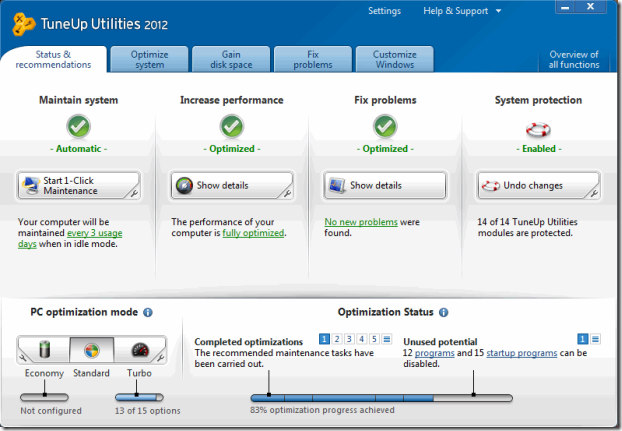
TuneUp Utilities 2012 Full Version Download

TuneUp Utilities provide amazing speed boost to your computer deleting all the temporary files and clutter in your computer. TuneUp Utilities provide easy user interface which you can use to maintain your computer. With TuneUp Utilities you can disable effects and other heavy stuff which will help you to boost overall speed and performance of your PC.


TuneUp Utilities 2012 Full Version Download

Features of TuneUp Utilities 2012 .:

1. Boosts Overall PC Speed.
2. Helps you too Defragment Drives.
3. Enabling and Disabling Start Up Programs can be done within program etc.

DOWNLOAD HERE

Connect with us on Facebook :)

By. HackingUniversity Get this Widget :)