

Saturday, May 26, 2012

Thursday, May 10, 2012
Block Facebook on PC (FB limiter)
FB Limiter is a windows application that can completely restrict access to facebook and Youtube on your computer.It is available in both free and paid versions.The Free version allows only complete blocking of youtube and facebook whereas in paid version you will have the ablity to block or unblock these sites for specific interval of time.
Features Of FB Limiter
- Block facebook and youtube access on your computer to anyone who uses it (Normal Lock)
- Limit facebook and youtube access to specific times during the week (e.g. Allow your kids to use facebook only one hour a day) (Time Lock - Pro version)
- Block facebook and youtube access to yourself for specific time duration. In cases when you are too much distracted and want to be sure you will not get a chance to use facebook or youtube. (Total Lock - Pro version)
- Control access to facebook on daily basis. (e.g. You could limit usage of facebook to just one hour daily) (Duration Lock - Pro version)
How To use Fb Limiter?
Grab your free copy of FB limiter by clicking here.Install and run the software on your computer.You will need to register for a free account to unlock the software.Once registered you will be greeted by a friendly user Interface (see screenshot below)

Now you can block these website on a single click of mouse.
Another great feature of this softwae is that it is password protected.Even if somebody know that you are blocking websites using FB limiter still they won’t be able to unblock them as the software will ask for a password before it can be used.
This software is compatible with windows xp service pack 2 and later.So test out this software and share you experience via comments
Monday, May 7, 2012
Create Freaky Facebook Timeline Covers
If you love to impress your Facebook friends or page fans than you know that you have a way to post a nice image on your timeline and than people can enjoy that image. We have also posted earlier a good online website that helps you in creating nice timeline covers for Facebook. But today we found another awesome website which can take your covers to the next level by giving a freaky touch to it. Well many professionals have already created covers like these and now you can also create some covers like below and impress your friends.

TrickedOutTimeline is a online trick covers creating website which I just discovered right now and enjoyed creating my first cover on it and thought that I should share the whole bunch of procedure for creating your own timeline covers. With TrickedOutTimeline you can give your profile a zoom effect, a mosaic old touch, merge two images together and create some awesome result and lots more.
How to make Tricky Timeline Cover :

1. Visit TrickedOutTimeline.com and click on any one of the above layout’s given on their website. (I tried the zoomable one and output was awesome.)

2. Now you will be taken to the image uploading option, from where you can upload an image from your computer or choose the current Facebook profile proto by signing in.
3. Now just adjust the selection on the image for what part you need and check the preview rendering on the right, when satisfied with the preview just click on the Done option.
4. Now your image will be precessed and you will get a option to like their page before you can download your images, just like their page and you will get image downloading options like below.

5. Download both the images Cover and Profile, now just login to your Facebook account and than click on change profile and change cover and upload the ones you have downloaded from this website.
Voila ! Enjoy these new tricky and freaky timeline covers for your Facebook, now its time to share your profile with your friends and impress them up, make sure to like this post if you got benefited from it.
Sunday, May 6, 2012
Facebook .apk Android App Version 1.9.2 Download
If you are a Facebook addict than you might know that taking your lappie everywhere is no where possible but of you own a smartphone with a nice easy internet access than having a fast Facebook app on that device is the best choice for ultimate messaging and chatting experience on Facebook. Facebook App for Android device has been updated to the latest 1.9.2 version adding more features and fixing many earlier bugs.

Features of Facebook Android App V1.9.2:
- Performance is Improved and many earlier bugs are fixed.
- Now you can create group messages and add friends to group conversation.
- Shortcuts are also added for sharing photos and messages form home-screen.
Download Facebook Android App V1.9.2 :
You can Download Facebook Android App to your PC and than transfer it to your device using data cable which comes with your device. After transferring this app to your device just install this app in a normal way and start updating status on the go, well you surely have to login :)
Wednesday, May 2, 2012
Fix Microsoft Services Problems Online Easily
Fixit is a great solution center from Microsoft which scans and fixes any issues affecting your pc with problems. Now Fixit contains all the categories in which problems can come and have very nice solutions to every problems.
Categories contained in this Fixit Solution website are right below .:

So as you can see all the categories like Windows, Internet explorer and all the other products which Microsoft manufactures. So now how this amazing Fixit website works, well you simply have to visit their Fixit website and then you will presented by some screen containing all these categories of interest you have to choose the one which is making troubles.
Now after you choose a category like I choose Windows and then you will see something like below .:

So now you have to choose what problem are you facing like it can be Connect to internet, after you click one thing you will see a sub-category like you see on the right hand side in the above image, and you will see something .:
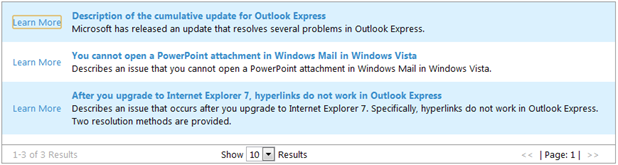
Now any of the useful link containing your solution well this can be really useful if you are facing any unknown problems. Well now fix problems and have fun.
VISIT FIXIT WEBSITE
Subscribe to:
Posts (Atom)
